Free AI LinkedIn tool by Apavin

Free AI LinkedIn post generator and post builder

Apavin's free LinkedIn post builder writes in your voice. Type an idea, pick a tone and a goal, and get a ready-to-post LinkedIn post with a scroll-stopping hook, a real story, a clear lesson and practical tips. No login, no sign-up, free forever.

Free foreverNo sign-upNo watermarkNothing stored

Updated by Vinayak Kaushal, Cofounder of Apavin

What do you want to post about?

Tone

Goal

Free forever. No login. Written with the SLAY structure: Story, Lesson, Actionable advice, You.

You

Your Name

Your headline · now

Posting twice a week is what grows a profile

Let Apavin research, write, add a banner and post it for you.

Your own Claude or ChatGPT does the writing in your voice. Nothing goes live until you tap approve.

Put my LinkedIn on autopilot

How to use the free LinkedIn Post Generator

  1. 1

    Write your idea in a line

    A lesson, a win, a mistake, a launch or an opinion. One or two sentences is enough.

  2. 2

    Pick a tone and a goal

    Story, professional, bold opinion, friendly, data-led or humble win, aimed at reach, leads, hiring, thought leadership, a launch or a job search.

  3. 3

    Copy and post

    Check the hook length and character count, copy the post, and paste it into LinkedIn.

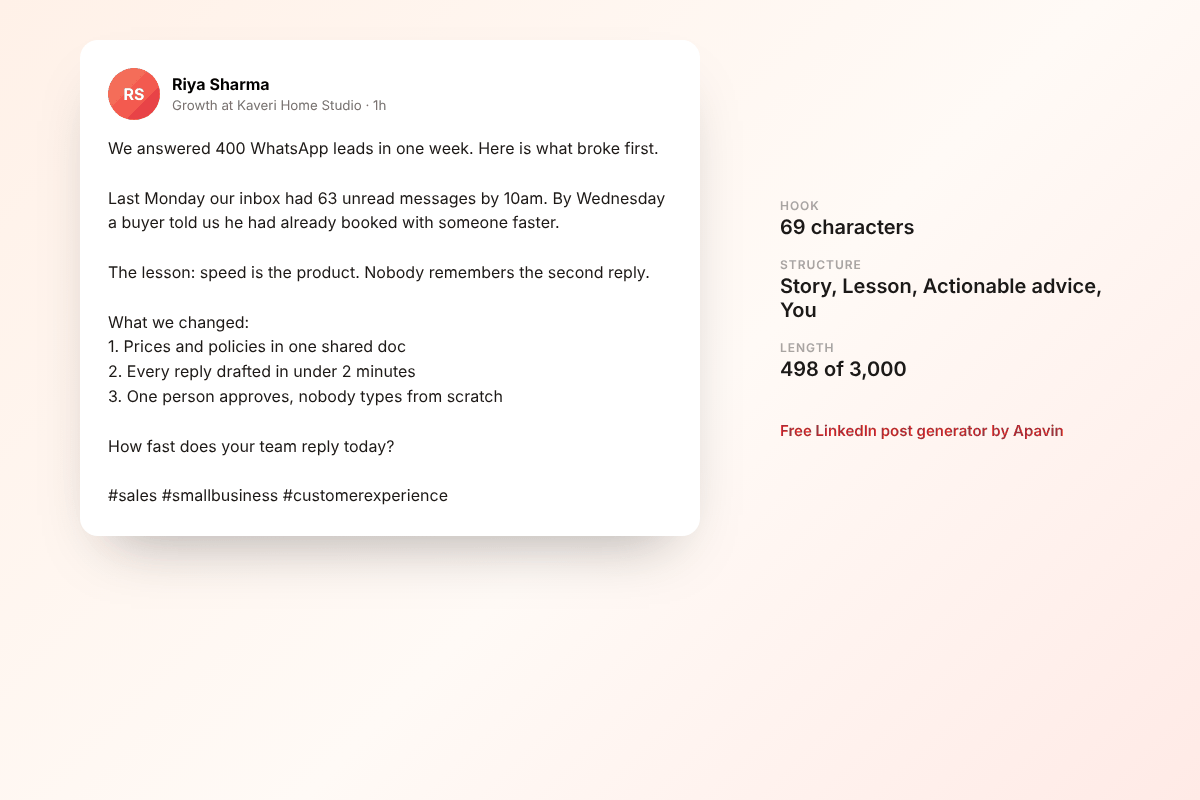
Example LinkedIn post with a hook, story, lesson and numbered tips, written by Apavin's free LinkedIn post generator
An example post in the SLAY structure: hook, story, lesson, numbered steps and a closing question.

What you get, free

SLAY structure

Story, Lesson, Actionable advice and a question to You: the shape that earns comments rather than scrolls.

Hooks under 140 characters

The first line is what shows before see more. The generator keeps it short and checks the length for you.

No made-up statistics

Where a real number belongs, you get a placeholder like [your number] instead of an invented figure.

No AI clichés

Written to avoid the phrases that make a post read as AI-generated, and never uses em dashes.

Six tones, six goals

From a founder story to a job-search update, the post fits why you are writing it.

Free, no login

No account, no credit card and no daily paywall.

Made by Apavin

One post is easy. Posting every week is what grows a profile.

Apavin researches what changed in your field, writes in your voice with your own Claude or ChatGPT, adds a banner image, and publishes on LinkedIn only after you approve.

  • Researched posts, not generic ones
  • Banner images made or uploaded, metadata stripped
  • Posting limits that protect your reach
  • Nothing goes live without your tap

A free LinkedIn post builder, not another template list

Most free LinkedIn tools hand you fill-in-the-blank templates. Apavin's free AI LinkedIn post generator builds the whole post from your idea: the hook, the story, the lesson, the steps and the closing question, in the tone you pick. It is a free builder for LinkedIn posts, captions and hooks with no login and no daily paywall.

It is one of Apavin's free AI tools, alongside a free AI resume maker, a free SEO keyword generator and a free AI couple photo generator.

How to write a LinkedIn post that people read

Most LinkedIn posts lose readers in the first line, because only about two lines show before see more. Lead with a specific, slightly surprising statement under 140 characters, then earn the click with a real moment: a meeting, a mistake, a number, a customer's words.

After the story, say what you learned in one or two sentences, give two to five steps someone can try this week, and end with one question about the reader's own situation. That is the SLAY structure this generator follows, and it is why posts built this way pull comments instead of passive likes.

LinkedIn post ideas when you do not know what to write

Share a decision you changed your mind on, a number from your work that surprised you, the question you ask in every interview, a process you replaced, a mistake from your first year, or what a customer taught you this month. Specific beats general every time.

If you are job hunting, write about a problem you solved and how, a skill you learned recently, or what you are looking for next and why. Recruiters search LinkedIn by keyword, so naming your role and skills plainly in posts helps them find you.

How often should you post on LinkedIn?

Two to three times a week is a steady rhythm for most professionals and founders. Posting several times a day splits your own reach, and long gaps make the algorithm forget you. Consistency matters more than volume.

Reply to comments in the first hour, keep hashtags to three or fewer at the end, and avoid putting links in the post body when reach matters; add them in the first comment instead.

Is it OK to use AI to write LinkedIn posts?

Yes, if the experience and the opinion are yours. Use the generator to structure your idea, find a sharper hook and tighten the wording, then add the real names, numbers and details only you know. Read it out loud before posting: if it does not sound like you, change it.

This generator avoids invented statistics and stock AI phrases on purpose, so your post reads like a person wrote it.

From a free generator to a LinkedIn that runs itself

The free tool writes one post at a time. Apavin, the company behind it, goes further: your own Claude or ChatGPT researches your field each week, writes posts in your voice, makes a banner, and Apavin publishes on your schedule after you approve each one.

It never likes, comments, connects or messages on your behalf, and it posts within limits that protect your account and reach.

Frequently asked questions

What is the best free AI LinkedIn post generator?

One that writes from your own idea, keeps the hook under 140 characters, avoids invented statistics and needs no login. Apavin's free LinkedIn post builder does all of that.

Is the LinkedIn post generator free?

Yes, completely free with no login and no sign-up. A fair-use limit per hour keeps it free for everyone.

What is a good LinkedIn hook?

A short first line under 140 characters that states something specific and slightly surprising, so readers click see more.

How long should a LinkedIn post be?

Between 800 and 1,400 characters works well for most posts. LinkedIn allows up to 3,000.

How many hashtags should I use on LinkedIn?

Three or fewer, placed at the end.

Will the post sound like AI?

It is written to avoid common AI phrases and em dashes. Add your own names, numbers and details to make it unmistakably yours.

Can Apavin post to LinkedIn for me?

Yes, with an Apavin account. Every post waits for your approval before it is published.

More free tools from Apavin

Apavin makes free AI tools anyone can use with no sign-up, no watermark and no trial: a free AI resume maker and ATS resume builder, a free LinkedIn post builder, a free SEO keyword generator, a free AI couple photo maker and a free live stream clipper for Twitch and Kick. Every one of them stays free forever. Driftline, the free Mac menu bar app, needs a free Apavin account to download.