How Clipper works, step by step
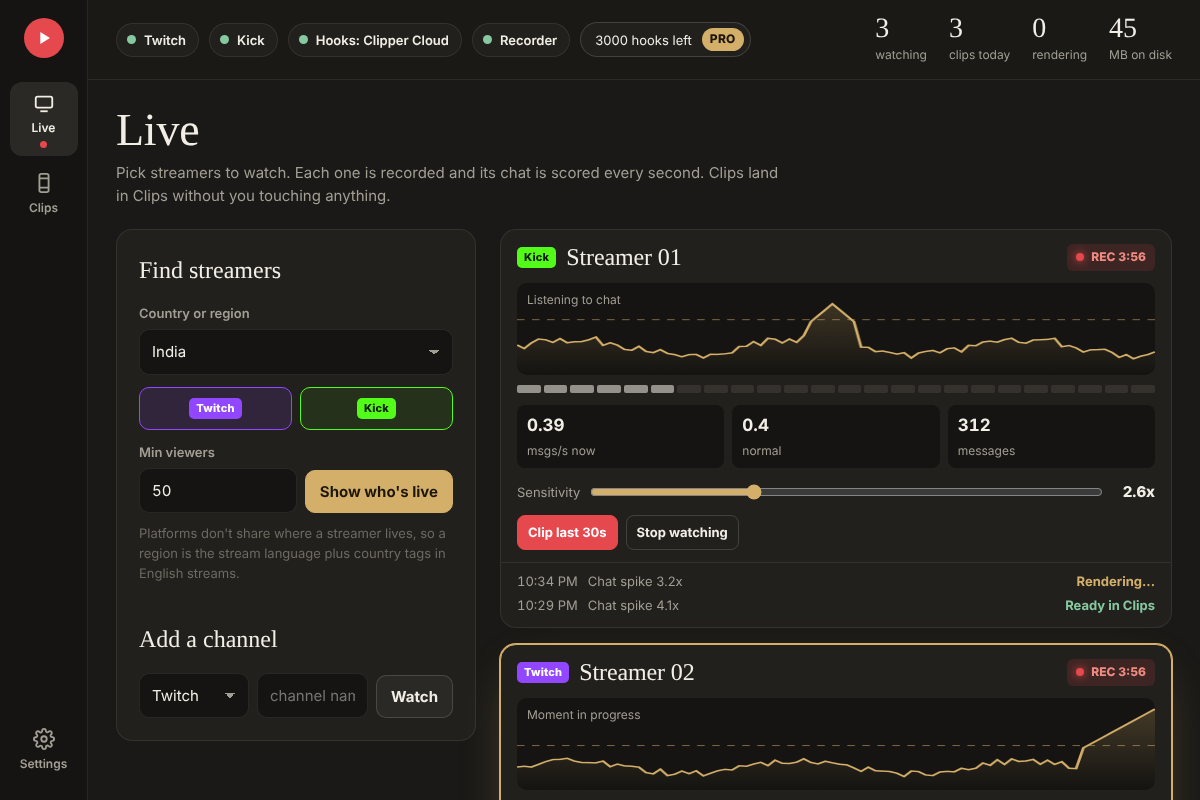
1. Recording. When you press Watch, Clipper opens the stream with Streamlink at 720p60 (or the best quality on offer) and FFmpeg writes it to your disk in 4-second pieces. It keeps the last 4 minutes per streamer and deletes anything older, so a day of watching doesn't fill your drive. The video is copied as it arrives, not re-encoded, so recording barely uses your CPU.
2. Reading chat. At the same time Clipper joins the channel's chat as an anonymous viewer (no Twitch or Kick login). Every second it counts the messages from the last 5 seconds and compares that with the channel's own normal pace, learned only from calm stretches. A 200-viewer stream and a 50,000-viewer stream are each judged against themselves.
3. Spotting the moment. A clip fires when chat clears a statistical bar for its size and either runs well above its normal speed (about 2.6 times by default) or fills with laugh, shock and clip-it words (KEKW, LUL, 💀, W, bhai, op). Those words only count above what that chat usually spams, so a busy chat being busy doesn't trigger anything. After a clip, the channel waits 45 seconds before the next one. On very busy channels Clipper also checks every 15 seconds for the streamer talking over a still game screen, which catches stories told to chat during a pause.
4. Cutting. Once chat calms down, Clipper takes the video from 22 seconds before chat reacted to 6 seconds after, so the clip has the setup, the moment and the reaction.
5. Transcribing. Whisper (the small model by default) runs on your computer and writes down every spoken word with its exact timing. Nothing is sent anywhere for this.
6. Hook and trim. The transcript and the top chat messages, as text only, go to an AI: your own key, Clipper Cloud if you signed in with Google, or Ollama on your computer. It writes a hook in the streamer's language, tightens the start and end to the payoff, and drops moments that won't land as a short. With no AI at all, you still get the clip with captions and a plain title.
7. Framing. Face detection looks at 14 frames from the clip. Gaming streams with a facecam become two panels, cam and gameplay. IRL streams get a 9:16 crop that follows the streamer. If no face holds still, the frame sits on a blurred copy of itself.
8. Rendering. FFmpeg renders 1080 by 1920 at 30 fps, burns in the word-by-word captions and the hook for the first 3 seconds, and levels the audio to -14 LUFS, the loudness Shorts, Reels and TikTok expect. It uses your graphics chip when it can (Apple, NVIDIA, Intel or AMD) and falls back to the processor.
9. Saving. The MP4 and a thumbnail are saved in the data/clips folder inside Clipper and appear in the Clips tab, ready to download.
What stays on your computer
The stream recording, the clips, the transcription and your API keys never leave your machine. Keys are kept in a .env file in the Clipper folder, and the dashboard only answers requests from your own computer.
Apavin only sees two things, and only when you sign in: the list request for live Twitch streamers in a region, and the transcript text of a moment when Clipper Cloud writes its hook or Hinglish captions. Use your own key or Ollama and even that stays local.
Twitch and Kick streamers by country
Neither platform shares where a streamer lives, so Clipper treats a region as the stream's language plus country tags and titles in English streams. Pick India and you get Hindi, Tamil, Telugu and other Indian-language streams, plus English streams tagged India or BGMI.
You can also add any channel by name and clip it, on either platform.
Vertical clips with animated captions, ready for Shorts, Reels and TikTok
Every clip is rendered at 1080 by 1920. Gaming streams with a facecam get the cam on top and the game below, IRL streams get a crop that follows the streamer, and anything else gets a sharp frame on a blurred background.
Captions are transcribed on your computer with Whisper and timed to each word, so they stay in sync with the speech. A hook bar sits on top for the first three seconds.
Free, Pro, or your own keys
The app is free and open source. Signing in with Google lists Twitch streamers and gives 50 AI hooks a month at no cost. Pro is ₹300 a month for 3,000 AI hooks with Hinglish captions.
If you'd rather not use an account, add your own AI key or run a local model with Ollama. Then hooks are unlimited and nothing goes through Apavin.
Clip with permission
Clipper records public streams to make highlights. Before posting another streamer's content, get their permission or join their clipping programme, and follow each platform's rules.